NOUN Missing Course Code Error: Why It Happens & How to Fix It
Learn why NOUN course code shows 'missing' error and how to fix it. Step-by-step solutions for registration issues.
 NOUNCOMPASS
NOUN Missing Course Code Error: Why It Happens & How to Fix It
Learn why NOUN course code shows 'missing' error and how to fix it. Step-by-step solutions for registration issues.


Learn why NOUN course code shows 'missing' error and how to fix it. Step-by-step solutions for registration issues. Portal labels can move, so match these steps with the screen in front of you.
Compare the code with your curriculum
"Missing course code" error happens when:
- Course not offered this semester
- You're not eligible (prerequisite not met)
- Course not available for your program
- Portal has temporary glitch
- Wrong level for your year of study
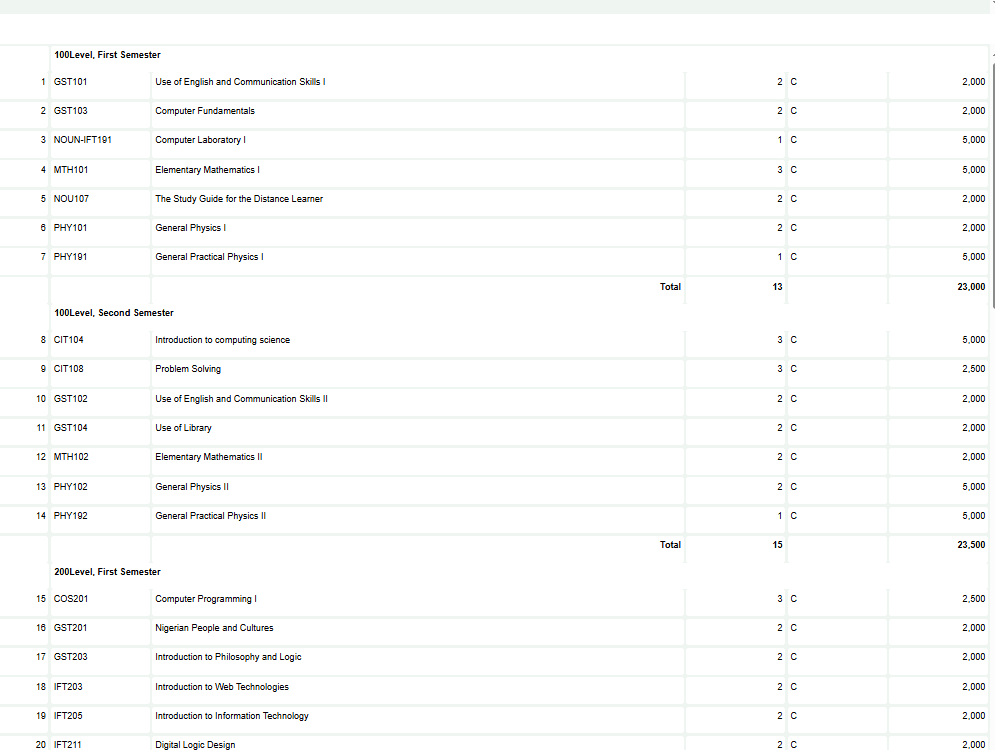
First check: Compare the missing code with your current curriculum, result statement, level, and semester. Save the portal view before asking the official academic-support route which code applies.
What To Check Before Choosing Another Course
This guide explains why course codes may not appear, what records to compare, what not to click, and how to report the problem clearly.
Why Course Code Shows as Missing
Reason 1: Course Not Offered This Semester
A course may not be available in the semester or curriculum currently attached to your record.
What to do: Check the current schedule and curriculum. Do not choose an alternative until the replacement is officially confirmed.
Reason 2: Prerequisite Not Met
The course may have a prerequisite or sequence rule, but a missing code does not prove that this is the cause.
What to do: Compare the prerequisite guidance with your result statement and request clarification if they conflict.
Reason 3: Not Eligible for Program Level
The code may belong to another programme level or curriculum version.
What to do: Verify the programme, level, semester, and curriculum version attached to the course.
Reason 4: Wrong Course Code
You typed wrong course code.
Solution: Double-check course code from course schedule.
Reason 5: Portal Glitch
The page may also be incomplete or temporarily unavailable. Refresh once and save the repeated state before reporting it.
Step-by-Step Fix
- Verify course code - Check against official course schedule
- Confirm course is offered - Check semester schedule
- Check prerequisites - Verify you've met requirements
- Reload once - Confirm the same account and session are still active
- Save the missing view - Include the course code and selected semester
- Contact official support - Ask which current course or code applies
Quick answers
Open any question for the answer.
01Is this an official NOUN guide?
NOUN Compass is independent. Confirm final requirements, dates, fees, and portal instructions through current official NOUN channels.
02What if the official portal shows something different?
Follow the current official portal information and contact your study centre or official support when clarification is needed.
03How often is this guide reviewed?
The displayed last-checked date shows the most recent editorial review, but official processes may change afterward.
04Q1: Can I take an alternative course instead?
Only after an authorised NOUN source confirms the alternative for your programme and curriculum.
05Q2: Will missing this course delay my graduation?
It may affect progress if the course is required and remains unresolved. Confirm its status before planning later semesters or graduation.
06Q3: Can I appeal missing course to take it anyway?
This page does not verify a universal appeal route or approval rate. Ask the current official support channel what review process applies.