NOUN Postgraduate School Fees: PGD and Masters Verification Guide
A practical guide to checking NOUN postgraduate school fees for PGD and Masters programmes, verifying current charges, and planning payment safely without unsupported finance assumptions.
 NOUNCOMPASS
NOUN Postgraduate School Fees: PGD and Masters Verification Guide
A practical guide to checking NOUN postgraduate school fees for PGD and Masters programmes, verifying current charges, and planning payment safely without unsupported finance assumptions.


A practical guide to checking NOUN postgraduate school fees for PGD and Masters programmes, verifying current charges, and planning payment safely without unsupported finance assumptions. Use the amount shown for your own student record before making a payment.
Why There Is No Single Postgraduate Fee Total
NOUN postgraduate fees vary by programme, level, semester, and current official schedule. Do not rely on an old fee range, social-media screenshot, or another student's portal record.
To know your payable amount, confirm the programme, session, semester, and visible charge lines inside the official NOUN portal before paying.
What This Guide Covers
This guide explains how to check the current fee breakdown for PGD and Masters programmes, read visible charge lines without forcing a universal total, spot risky assumptions, and keep the right records before you pay or escalate a mismatch.
Why This Guide Stays Narrow
Postgraduate fee questions are too important for guesswork. This page sticks to what a NOUN student can actually confirm from the current portal and related NOUN pages instead of promising hidden discounts, automatic waivers, or one rule for every postgraduate route.
Step-by-Step Guide: Checking NOUN Postgraduate Fees
Step 1: Confirm your programme and level
Before checking any amount, confirm whether your record is PGD, Masters, MBA, M.Ed, M.Sc, M.A, LL.M, PhD, or another postgraduate route. Also confirm the current session and semester. A fee figure from a previous semester may not apply to a new session.
Step 2: Use your own portal record
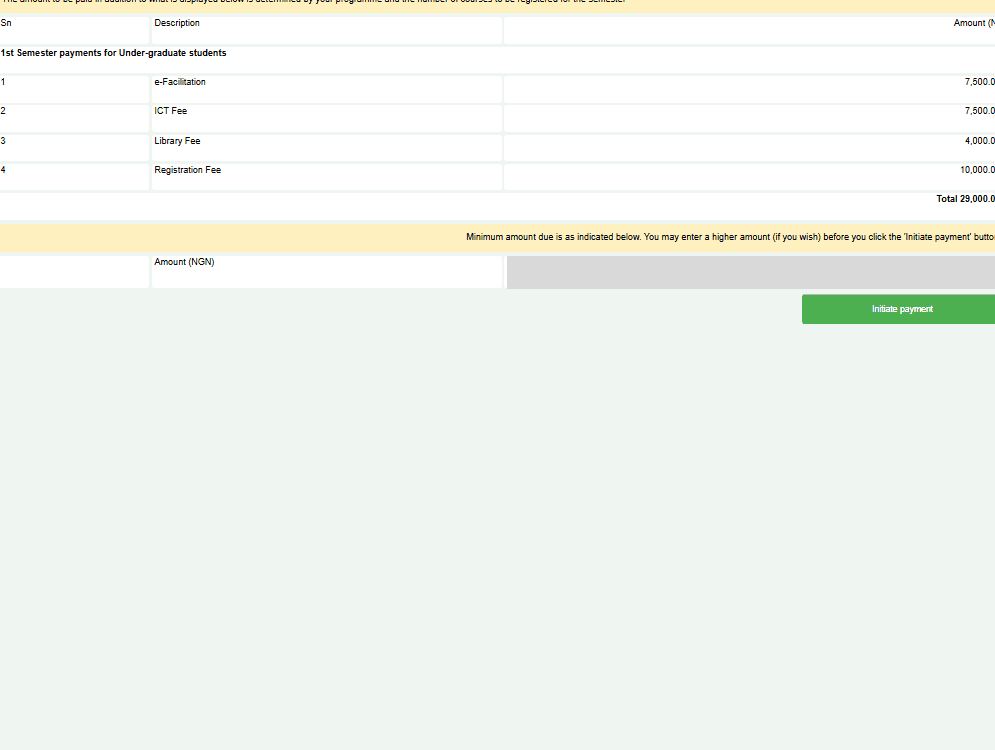
Your own portal record is the safest place to confirm the payable amount. Look for the section that shows fee items, semester registration, course registration, exam registration, wallet balance, or payment history.
If the portal displays a breakdown, save it before paying. If it only displays a total, save the total and the page context showing the session and semester.
Step 3: Check each charge line
Postgraduate students should pay close attention to semester registration, course registration, examination registration, any project-related line visible on the current account, outstanding balances from earlier semesters, and wallet or Remita references.
Do not assume all postgraduate programmes use the same charge pattern.
Step 4: Generate payment only from the official workflow
When you are ready to pay, generate the payment reference from the official workflow connected to your own record. Save the reference before leaving the page. If a payment fails or does not reflect, that reference becomes the evidence support will need.
Step 5: Verify reflection after payment
After payment, return to the portal and confirm that the wallet, fee record, or registration status has updated. If the amount does not reflect, do not immediately repeat payment. Check your bank debit, Remita reference, wallet history, and payment status first.
Step 6: Keep a semester payment folder
Create one folder for the semester and save the fee breakdown screenshot, payment reference, bank debit proof, portal confirmation, registration slip, and any support-ticket acknowledgement.
Common Mistakes
Mistake 1: Assuming all programmes cost the same
Students often compare one postgraduate example with another as if every route follows the same charge pattern. That is unsafe. Programme category, level, and current visible charge lines can differ.
Mistake 2: Treating a planning estimate like a final invoice
A planning figure is not a payment instruction. Reopen the current official record before funding the wallet or generating payment.
Mistake 3: Ignoring category differences
Undergraduate examples, another student's fee sheet, or an old screenshot should not control a postgraduate payment decision.
Troubleshooting
| Problem | Cause | Solution |
|---|---|---|
| Fee amount in portal seems wrong | You may be checking the wrong programme category or level | Verify the exact PGD, Masters, or other postgraduate route shown on your record |
| No postgraduate fees shown | Your student record may not be fully at the expected stage yet | Confirm enrollment status through the current official route before assuming a portal error |
| Payment rejected for postgraduate fees | The workflow may be blocked by an account or record issue | Check the current charge line, payment reference, and any visible status before escalating |
| Can I pay everything for the full programme now? | The current workflow may not be designed that way | Follow the current portal logic rather than planning from a guess |
| I missed a payment window | The present account state is no longer clear enough to guess | Preserve the current record and ask one precise official support question |
Quick answers
Open any question for the answer.
01Is this an official NOUN guide?
NOUN Compass is independent. Confirm final requirements, dates, fees, and portal instructions through current official NOUN channels.
02What if the official portal shows something different?
Follow the current official portal information and contact your study centre or official support when clarification is needed.
03How often is this guide reviewed?
The displayed last-checked date shows the most recent editorial review, but official processes may change afterward.
04Are there additional costs beyond semester fees?
There can be additional charge lines beyond a simple semester total, but students should treat only visible official charges as confirmed. Use budget buffers for planning and your current portal record for payment decisions.
05Can I get a refund if I withdraw?
This page does not verify a universal postgraduate refund rule. If withdrawal or overpayment becomes relevant, confirm the current official refund process before assuming a timetable or outcome.
06Do international students pay different fees?
The reviewed evidence for this page did not verify a postgraduate-specific international fee rule. Students in that situation should use the current official admission and payment route rather than rely on generic assumptions.
07What happens if I cannot pay the full amount on time?
Do not assume there is an approved postgraduate installment or deferral scheme unless your current official route states one clearly. Preserve the current charge details and ask a precise authorised question before acting on informal finance advice.
08Are there any discounts for postgraduate students?
This page does not verify a general postgraduate discount framework. Treat any discount, waiver, or sponsorship claim as unverified until you can match it to a current official source.
09When do I start paying once I am admitted?
Payment timing should be confirmed from your current official admission and portal workflow. Do not depend on a generic timeline if your own record shows a different next step.
10Is thesis supervision charged one way for every programme?
Not safely enough to state as a universal rule here. If a relevant line is not yet visible on your record, do not present one charging model as certain for every postgraduate student.