How To Read NOUN CGPA, Class Of Degree, And Outstanding Credit
Learn where the verified NOUN workflow displayed CGPA, class of degree, total credit earned, and outstanding credit, and how to interpret those metrics without assuming unverified academic processes.
 NOUNCOMPASS
How To Read NOUN CGPA, Class Of Degree, And Outstanding Credit
Learn where the verified NOUN workflow displayed CGPA, class of degree, total credit earned, and outstanding credit, and how to interpret those metrics without assuming unverified academic processes.


Learn where the verified NOUN workflow displayed CGPA, class of degree, total credit earned, and outstanding credit, and how to interpret those metrics without assuming unverified academic processes. Treat your official result statement as the final academic record.
Where Do CGPA And Outstanding Credit Appear?
The earlier editorial pass did not record CGPA on the first My progress page. It recorded CGPA, class of degree, total credit earned, and outstanding credit on the ERP statement-of-result page opened through the Support portal's Result statement action. Compare that historical route with the current interface before relying on it.
Why This Page Matters
Students often mix up three different result questions:
- where can I see grades?
- where can I see CGPA?
- where can I understand what I still owe academically?
The live session showed that these answers do not all come from the same surface. My progress was useful for result history, but the deeper ERP statement page was where broader academic metrics became visible.
The Verified Path To These Metrics
The observed route was:
- student portal
My progressSupport- Support portal login
Result statement- ERP page at
erp.nou.edu.ng/stsor
That ERP page is the verified place to check:
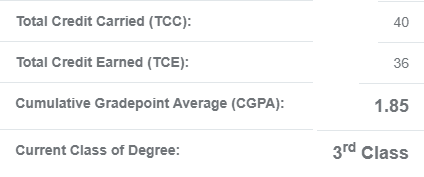
CGPACurrent class of degreeTotal credit earnedOutstanding credit
What We Actually Saw
The performance-standing panel and surrounding ERP sections confirmed that the result statement page carries more academic summary information than the first student-portal result screen.
The earlier editorial pass recorded the visibility of:
CGPACurrent class of degreeMin. credit requiredTotal credit earnedOutstanding credit
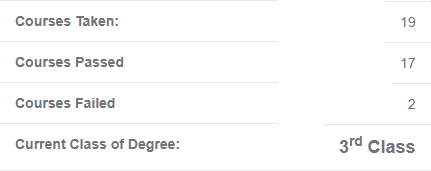
It also verified summary statistics for:
- courses taken
- courses passed
- courses failed
That makes this page useful for academic interpretation, not only for checking one result row.
Where Each Academic Metric Appeared
CGPA
The earlier editorial pass recorded the location of CGPA on the ERP statement page. This guide does not teach a formula that pass did not check; it shows where the value appeared in that historical observation.
Use CGPA here as the confirmed official metric to review, save, and compare over time.
Current class of degree
This value appeared alongside the broader academic standing information on the same ERP page. Its importance is practical: many students look for overall academic standing and mistakenly expect the first portal page to provide it.
The workflow recorded in the earlier editorial pass pointed to the deeper page.
Total credit earned
This metric helps you understand how much confirmed academic credit the system is already counting in your record.
Outstanding credit
This metric matters because it shows what remains from the system's perspective. It is not the same thing as inventing your own estimate from memory or from informal advice.
Why Students Misread These Fields
There are three common mistakes:
- expecting CGPA on
My progress - treating one incomplete result row as a full academic summary
- assuming outstanding credit and outstanding courses mean exactly the same thing
The workflow recorded in the earlier editorial pass separated them:
My progressgives first-layer history- the ERP statement page gives the fuller academic summary
- outstanding courses appear in a separate section on the same ERP page
When To Use This Page In Your Workflow
Use this page after:
- checking the first result/history screen
- entering the Support portal
- opening
Result statement
This is the stage where broader academic planning becomes safer. It connects naturally to:
- exam registration
- course registration
- outstanding-course review
- TMA and eLearn preparation
- the NOUN CGPA calculator when you want to estimate a running average before comparing it with the official ERP value
What This Guide Does Not Claim
This guide does not claim:
- how NOUN calculates CGPA internally beyond what was visibly displayed
- how a class of degree changes after future releases
- a transcript workflow
- an explicit carryover workflow
Those remain separate questions unless a future live session verifies them directly.
Common Mistakes To Avoid
- looking only at
My progressfor CGPA - using old screenshots as final academic proof
- merging outstanding-credit interpretation with unverified carryover advice
- assuming class-of-degree status from memory instead of the current ERP page
- skipping PDF export or print when you may need a record later
Troubleshooting
I cannot see CGPA on the first portal page
That matches the observed workflow. Open the Support portal and use Result statement.
I can see CGPA, but I do not understand my unfinished requirements
Use the Outstanding Courses section on the same ERP page and read How To Check Outstanding Courses On NOUN Result Statement.
I need proof I can save
The observed ERP page showed Export as PDF and Print, which makes it a practical record page once loaded.
Verification Notes
This guide is based on the live NOUN results workflow recorded in an earlier editorial pass dated 19 June 2026. That pass recorded CGPA, class of degree, total credit earned, and outstanding credit on the ERP statement-of-result page reached through the Support portal, not on the first My progress page. A current source recheck is pending.
Quick answers
Open any question for the answer.
01Is this an official NOUN guide?
NOUN Compass is independent. Confirm final requirements, dates, fees, and portal instructions through current official NOUN channels.
02What if the official portal shows something different?
Follow the current official portal information and contact your study centre or official support when clarification is needed.
03How often is this guide reviewed?
The displayed last-checked date shows the most recent editorial review, but official processes may change afterward.
04Where was CGPA actually visible?
On the ERP statement-of-result page opened from the Support portal.
05Was class of degree visible on My progress?
The earlier editorial pass did not record it there; it recorded it on the deeper ERP page.
06Is outstanding credit the same as outstanding courses?
Not exactly. Outstanding credit is a metric, while outstanding courses were shown as a separate list on the ERP page.
07Can I save this record?
Yes. The observed page included `Export as PDF` and `Print`.