Why Your NOUN TMA Score Is Not Showing
Learn how to verify missing NOUN TMA scores using the grade surfaces observed in eLearn, the correct course record, and a safe support workflow when the mark still does not appear.
 NOUNCOMPASS
Why Your NOUN TMA Score Is Not Showing
Learn how to verify missing NOUN TMA scores using the grade surfaces observed in eLearn, the correct course record, and a safe support workflow when the mark still does not appear.


Learn how to verify missing NOUN TMA scores using the grade surfaces observed in eLearn, the correct course record, and a safe support workflow when the mark still does not appear. Treat your official result statement as the final academic record.
Where Should You Look For A TMA Score?
If your NOUN TMA score is not showing, do not check only the TMA activity page. In the observed eLearn session, the clearer score surface was the course-specific grade report inside Grades. First verify the correct course and TMA, then check the broader Grades overview, then open the course-specific grade breakdown. If the mark still is not visible, prepare safe evidence before contacting support.
Start With A Workflow Check, Not A Panic Check
The observed session showed a common trap: the TMA activity page and the grade-report page do different jobs.
- The TMA activity page shows attempt state.
- The grade report shows how marks are recorded inside the course.
So when a score appears missing, your first question should be:
Am I checking the right page for the right kind of answer?
That single shift solves a lot of confusion.
What We Actually Observed About Scores
The live eLearn session revealed two grade surfaces:
Gradesoverview- course-specific grade report
The broader overview showed course totals across enrolled courses. The course-specific grade report showed the detailed TMA line items and the overall course total.
In the observed Numerical Analysis (MTH213_261) course, the detailed report included:
Tutor Marked Assignment 1 (TMA1)Tutor Marked Assignment 2 (TMA2)Tutor Marked Assignment 3 (TMA3)- calculated weights
- raw scores
- percentages
- final course total
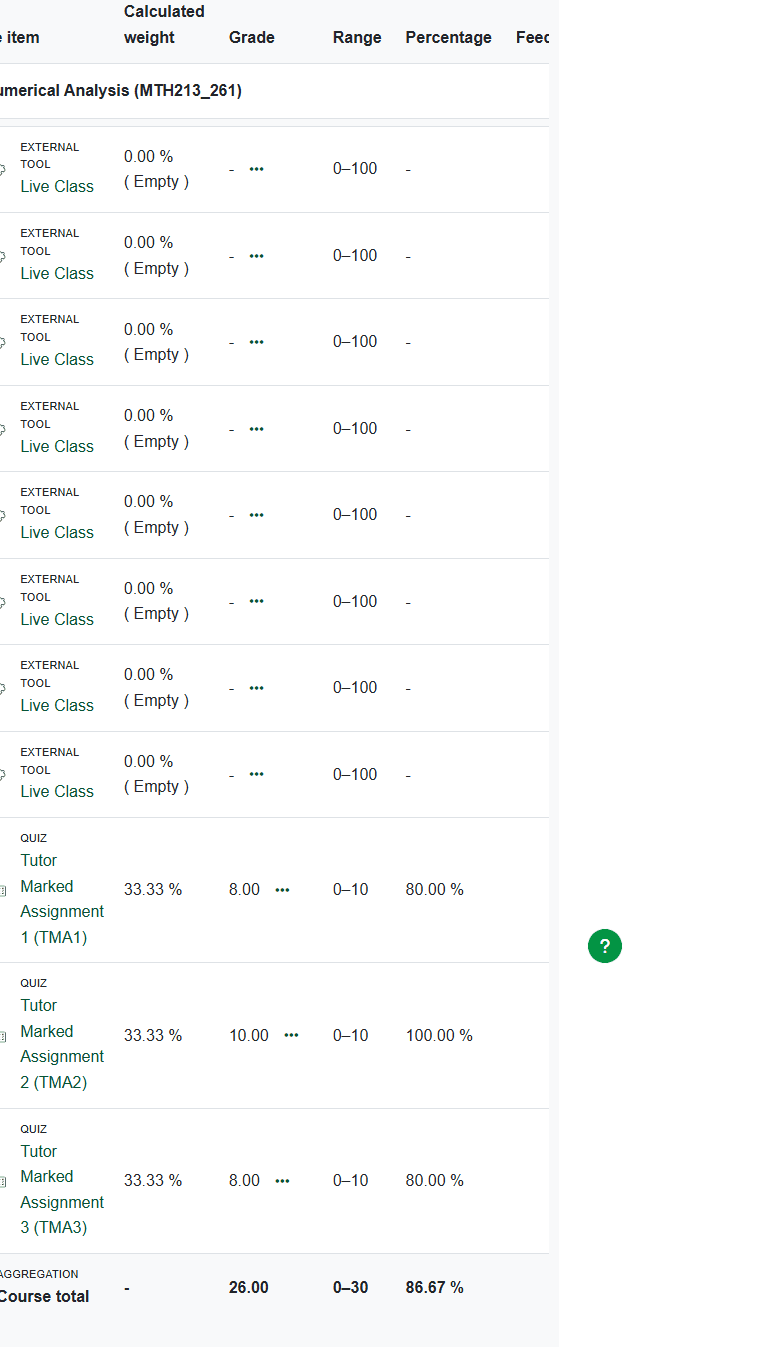
That means a missing-score workflow should always include the grade report, not only the TMA page.
Step-By-Step: What To Check First
Step 1: Confirm the correct course
Make sure you are checking the grade record for the exact course connected to the TMA. Students can lose time by opening the right platform but the wrong course.
Step 2: Confirm the exact TMA label
The observed course separated TMA1, TMA2, and TMA3. If you remember only "my TMA score is missing," you may end up checking the wrong line item.
Step 3: Open the broader Grades area
Use the visible Grades route on eLearn. This helps you confirm whether the course total itself is already showing.
Step 4: Open the course-specific grade report
This is the stronger diagnostic step because it can reveal whether:
- the course total is visible but a specific TMA line is unclear
- the TMA line is present with a score
- the grade record is visible but incomplete
Step 5: Compare the grade area with the TMA activity page
Return to the TMA page and check whether the attempt summary shows the work as finished. If the TMA is not even marked Finished, the missing score question may actually be a submission-state question.
For help with that part of the workflow, read How To Submit TMA On NOUN eLearn.
Use The TMA Activity Page As A Status Check
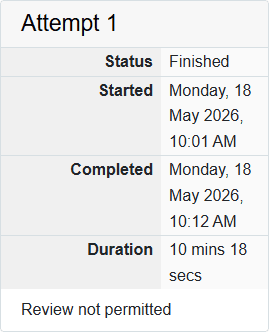
In the observed workflow, the TMA page itself was still valuable, but not because it was the clearest score location. It was valuable because it showed:
Status FinishedStartedCompletedDurationReview not permitted
Those fields help you answer an earlier question:
Did the platform record the attempt as completed?
If you do not know that answer, a score complaint can become messy quickly.
What A Missing Score Can Mean In Practice
Because this guide stays inside observed facts, it does not invent backend explanations. Instead, it focuses on the real verification questions students can answer safely:
- are you checking the right course?
- are you checking the right TMA?
- are you looking at
Gradesor only at the TMA page? - does the TMA page show the attempt as finished?
- do you have safe evidence of the current page state?
That approach is more useful than guessing a hidden cause you cannot confirm from the interface.
A Safer Verification Routine
Use this routine before you open support:
- open the course-specific grade report
- look for the exact TMA line item
- note whether the course total is visible
- return to the TMA page
- confirm whether the attempt is marked
Finished - save safe screenshots of both surfaces
- record the course code and TMA label
- only then prepare support follow-up
This turns a vague complaint into a traceable one.
Common Mistakes Students Make
- checking only the TMA page and never opening
Grades - checking
Gradesbut not opening the specific course report - confusing
TMA1,TMA2, andTMA3 - assuming a missing visible score means the TMA never submitted
- escalating without a course code or safe screenshot
These are workflow mistakes, not intelligence mistakes. The observed platform simply divides information across multiple pages.
Troubleshooting
The course total is visible but the TMA detail feels unclear
Open the course-specific grade report and examine the TMA line items one by one. The detailed report is better than the summary view.
The TMA page looks finished but I still do not see a mark
That is exactly when the grade-report check matters most. The TMA page confirms attempt state, but the grade report confirms mark visibility.
I only checked the dashboard before
Return to the Grades area. The dashboard is useful for entry and navigation, but it is not the clearest place to diagnose a missing TMA score.
I am not sure whether I am in the right course
Verify the course code through the course page first. If needed, use How To Find TMA On NOUN eLearn and the wider eLearn guide.
I still need official help
Use the eLearn support route, but only after collecting safe evidence.
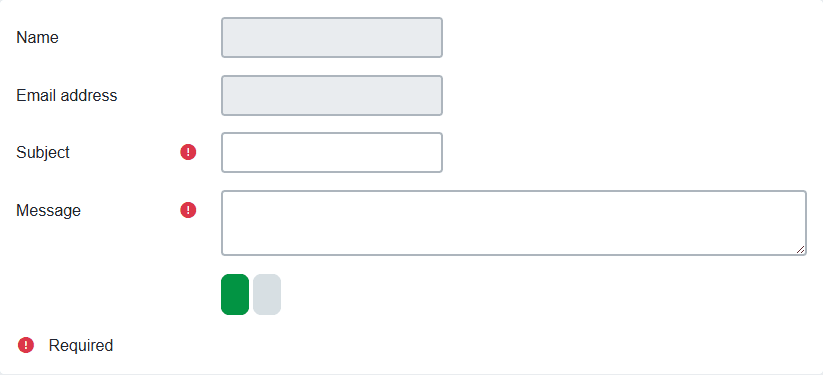
If you need help preparing that message, use NOUN Support Ticket Guide. If the broader course record also looks wrong, compare with How to Check NOUN Results.
What To Prepare Before Escalating A Missing Score
The support step becomes much easier when you prepare the right record first. Based on the observed workflow, your checklist should include:
- the exact course code
- the exact TMA label such as
TMA1,TMA2, orTMA3 - a safe screenshot of the TMA page showing the attempt state
- a safe screenshot of the course-specific grade report
- the difference between what is visible and what you expected to see
This matters because a statement like my TMA score is not showing is too broad on its own. A more useful message is:
I checked the course-specific grade report for MTH213_261 and the TMA1 line is not visible, while the TMA page shows a finished attempt state.
That kind of report is grounded in observed page surfaces, not guesswork.
How This Page Fits The Wider Student Journey
A missing TMA score does not exist in isolation. It usually affects the next academic decisions a student wants to make, such as:
- checking the final course total
- planning for exams and result review
- deciding whether a support case is necessary
- preserving evidence before the portal changes
That is why this page should be used together with:
- the wider eLearn and TMA guide
- the TMA submission guide
- the broader result-checking guide
- the support-ticket guide
Verification Notes
An earlier editorial pass dated 19 June 2026 recorded TMA marks in the course-specific grade report for Numerical Analysis (MTH213_261). The guide does not claim to know every reason a mark could be delayed; it documents the surfaces observed in that historical session. A current source recheck is pending.
Quick answers
Open any question for the answer.
01Where should I check for a TMA score first?
Check the course-specific grade report first because that was the clearest score surface in the observed eLearn session.
02Should I rely only on the TMA activity page for marks?
No. The TMA page showed attempt status, but the detailed score breakdown was easier to confirm in Grades.
03What should I save before asking for help?
Save the course code, TMA name, session details, safe screenshots of the TMA state and grade area, and any related registration or support record.
04Where should I look first when a TMA score seems missing?
Check the course-specific grade report first because that was the clearest score surface in the observed session.
05Is the TMA page enough by itself?
No. The TMA page is better for attempt status. The grade report is better for marks.
06What if the TMA page says Finished?
That confirms the attempt state, but you should still check `Grades` and the course report for the actual score.
07What should I save before contacting support?
Save the course code, the TMA label, a safe screenshot of the TMA state, and a safe screenshot of the grade surface you checked.
08Can NOUN Compass fix a missing TMA score?
No. NOUN Compass is an independent guide site and cannot access or change official student records.